Don't build a budget gaming PC in 2026. Buy somebody else's laptop.
Somebody paid almost £3,000 for this laptop in 2023. I paid £1,150. The cheapest desktop I could build to replace it costs more than that before you plug in a monitor.
In early 2025 I paid about £160 for 64 GB of DDR5-6000 for my desktop. Today, 27 September 2026, the cheapest 64 GB DDR5-6000 kit in stock at Amazon, Overclockers or Scan costs £799.99.
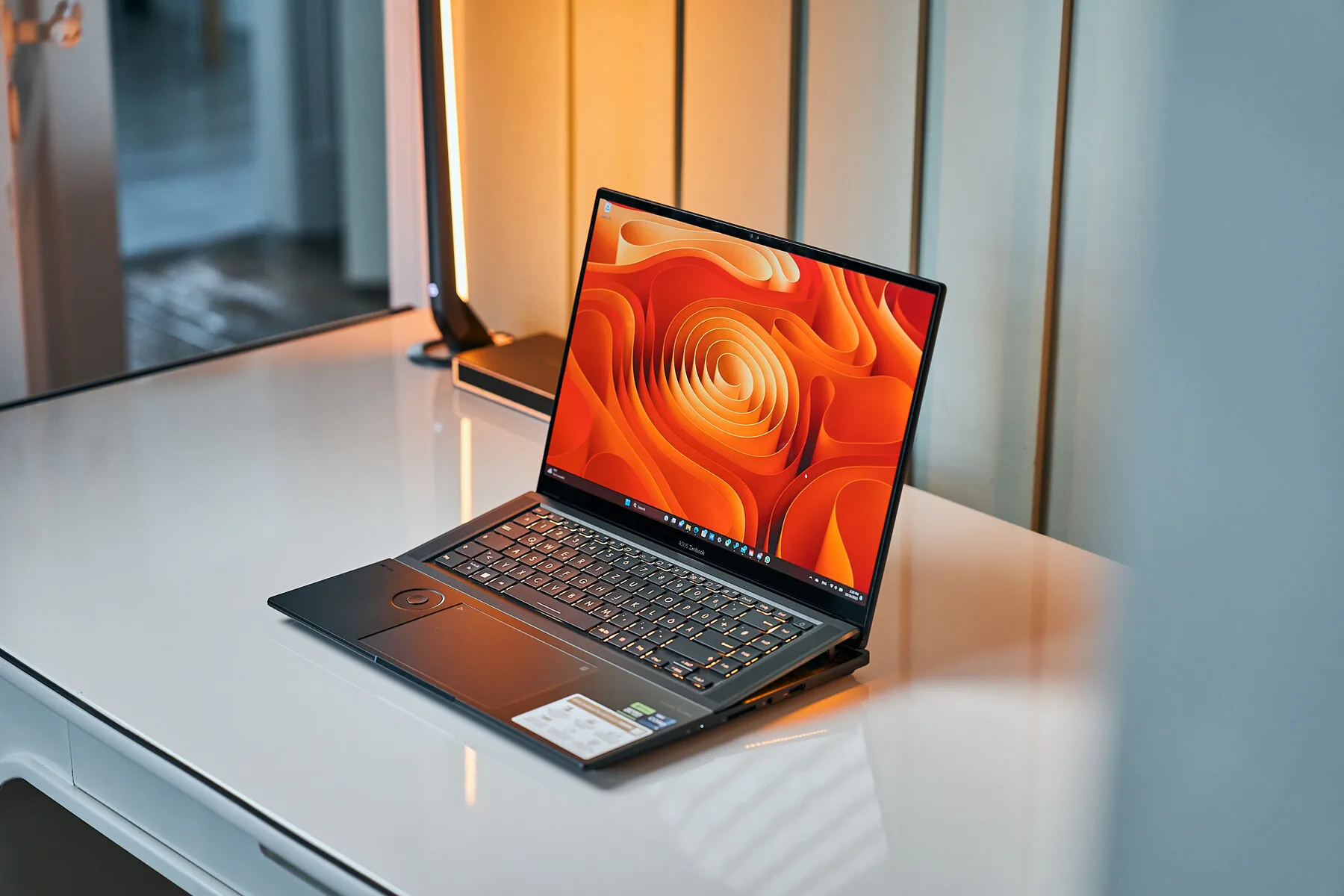
That is why my new gaming PC is somebody else’s laptop: a used 2023 Asus Zenbook Pro 16X OLED with a 14-core Core i9-13905H, an RTX 4080 Laptop GPU, 32 GB of LPDDR5X and a 16-inch 3.2K OLED that runs at 120 Hz. It cost almost £3,000 new. I paid £1,150.
Then I priced the desktop I would otherwise have built, part by part, new and in stock, from three shops I trust. The tower alone, with Windows, came to £1,208.85.
A desktop is still faster, quieter and easier to upgrade. It is no longer cheaper. If you are starting from scratch in 2026, don’t build a budget gaming PC. Buy a used high-end laptop.
Disclosure: I bought this computer myself. This post has no affiliate links.
Why I needed a second computer
I travel a lot for work. My work machine is a MacBook Air, and it is excellent at that job. The battery lasts forever, the speakers are irritatingly good and the trackpad was designed by people who have met a human hand. It is also managed by work, so I’m not installing games on it, and gaming on macOS is still a patchwork of native ports, compatibility layers and streaming.
A lot of my social life happens online. At home I play games with friends, sit in voice chat and tinker with hardware. On a work trip the alternative is a hotel room and a television whose menu slowly forgets how HDMI works. That got lonely faster than I expected.
My personal laptop was a 2018 Huawei MateBook X Pro, which had aged from premium ultrabook into something that could open League of Legends if asked kindly.
The first plan was a small-form-factor desktop with a portable monitor, keyboard and mouse, all plugged into whatever television the hotel had. It would have worked. It would also have turned every overnight stay into a small trade show.
The second plan was a new thin-and-light Windows laptop. Intel’s Panther Lake chips looked good for integrated graphics and battery life, and the Honor MagicBook 14 built on them had a Notebookcheck review and the right specification. It just didn’t seem to be sold in Britain. I checked the retailers and contacted Honor UK, and nobody could tell me when it would arrive or what it would cost. Importing one through AliExpress came to nearly £1,500 before tax, and I had no way to price the warranty or regional support at all.
So I went back to the desktop and priced it properly.
Memory is the expensive part now
A budget gaming PC used to save money in the boring places. The processor and graphics card cost what they cost, and the memory, storage, case and power supply were where you shaved the total down. In 2026 the boring places are the expensive ones.
The same memory, 20 months apart
64 GB of DDR5-6000 now costs five times what I paid
The kit in my desktop is not a special case. On 27 September the cheapest 32 GB DDR5-6000 kit in stock at Overclockers was £389.99.
The cause is AI data centres. AI accelerators use stacked high-bandwidth memory (HBM), and the servers around them need huge amounts of ordinary DRAM and flash storage. The companies that make that memory also make the memory in your PC, and they have moved production to the higher-margin orders. IDC’s December 2025 analysis described exactly that: Samsung, SK Hynix and Micron shifting capacity from phones and PCs towards hyperscalers. TrendForce reported that conventional DRAM contract prices rose by roughly 93 to 98% in the first quarter of 2026 alone, while the three biggest suppliers kept prioritising server orders. Micron’s June 2026 investor material expected tight supply for both DRAM and NAND to last beyond 2027.
Microsoft picked this moment to publish a Windows support page calling 16 GB the baseline for gaming and 32 GB the “no worries” upgrade. It removed the page within days after people pointed out what 32 GB now cost. The advice itself was reasonable, since games, a browser, Discord and Windows together can easily use more than 16 GB. Recommending more RAM during a RAM shortage is like recommending a second bathroom during a housing crisis.
DDR4 doesn’t get you out of it
The obvious workaround is an older DDR4 system, and it does help. The cheapest 32 GB DDR4-3200 kit I found in stock was £209.99 at Amazon, £180 less than the DDR5 equivalent. That still costs more than the motherboard, power supply and case in the build below put together, and TrendForce noted in June that the big suppliers were cutting wafer allocations for DDR4 and other older memory.
The old platforms have a second problem. The best processor that fits an old socket holds its value far longer than its performance justifies, because owners will pay extra for one last drop-in upgrade that saves them a new motherboard and memory. AMD still describes the Ryzen 7 5800X3D as its top gaming processor for a DDR4 platform. Its 3D V-Cache stacks extra cache on top of the cores, which games like because the processor makes fewer slow trips out to system memory. Owners like it because it delays a rebuild, and sellers like it because owners do. Whatever you save on a cheap AM4 board leaks back out through the CPU listing.
The desktop I priced instead
I wanted a fair fight, so I set some rules. Every part had to be new, in stock and from a known brand, and bought from Amazon (sold by Amazon itself), Overclockers or Scan. Plenty of cheaper-looking listings on price comparison sites turned out to be out of stock, on pre-order or from shops I wouldn’t give a card number to. Wherever there was a choice, I took the cheaper part, even when that made the desktop worse than the laptop. The basket below starts with the cheapest complete setup. Change it to match what you already own, and open the parts list to see every price and shop.
New parts, in stock, 27 September 2026
The cheapest desktop setup costs £198 more than the used laptop
Change the parts to match what you already own.
The laptop is £197.83 cheaper, and it comes with a battery, a webcam and a 3.2K OLED.
Parts list, 10 items
| Intel Core i5-14400F, boxed with Intel's cooler | Amazon | £148.97 |
|---|---|---|
| Asus Dual Radeon RX 9060 XT 16 GB | Amazon | £439.99 |
| Kingston NV3 1 TB PCIe 4.0 | Scan | £129.98 |
| MSI MAG A550BN 550 W | Amazon | £39.99 |
| Montech X3 Mesh | Scan | £29.99 |
| Corsair Vengeance LPX 32 GB DDR4-3200 | Amazon | £209.99 |
| Asus Prime H610M-A WIFI D4 motherboard | Overclockers | £79.99 |
| Windows 11 Home | Overclockers | £129.95 |
| MSI PRO MP273QW E14, 27-inch 1440p 144 Hz IPS | Overclockers | £118.99 |
| Logitech MK270 keyboard and mouse | Amazon | £19.99 |
| Total | £1,347.83 |
The desktop loses on paper almost everywhere. Its processor has 10 cores to the laptop’s 14. Its memory is DDR4. Tom’s Hardware’s June 2026 benchmarks put the RX 9060 XT 16 GB about 14% behind a desktop RTX 4070 at 1440p ultra, and it was still the cheapest card near that class I could find in stock at those three shops. Its monitor is a 1440p IPS panel instead of a 3.2K OLED, and it has no battery or webcam. It wins on graphics memory, 16 GB to 12, and on everything you can upgrade later.
Leave Windows out and the setup is still £1,217.88. Swap in the cheapest 1440p OLED monitor and it becomes £1,548.83. Moving to DDR5 adds another £180 for the memory alone. The desktop only gets cheaper than the laptop once you already own the monitor and the Windows licence.
Buying a prebuilt doesn’t rescue it either. The cheapest in-stock Scan prebuilt I found with Windows, an i5-14400F and an RTX 5060 was £1,279.99, with 16 GB of memory, an 8 GB graphics card and no screen.
I haven’t priced a used-parts desktop, because I don’t trust marketplace listings enough to put them in a table. A patient used buyer could beat these numbers. They would still be buying used memory in a shortage, and they would still need a screen.
Build the desktop anyway if you already own a case, power supply, storage or monitor; if you want quiet cooling under long loads; if you need more than 32 GB or several drives; if you plan to swap the graphics card later; or if you just enjoy building PCs, which is a fine hobby even when the spreadsheet disagrees. If you are starting from nothing, the laptop wins.
New laptops cost even more
A new laptop solves the travel problem, but it doesn’t escape memory prices. It sells the same expensive parts with a custom motherboard, cooling system and chassis wrapped around them.
Apple’s 13-inch MacBook Air launched at £1,099 in March 2026. By 30 August, Apple’s UK configurator started it at £1,299. That is Apple’s mainstream laptop, with integrated graphics, costing £149 more than the machine at the top of this post.
Gaming models were further out. On the same day, Dell listed a 32 GB Alienware 16 Aurora with an RTX 5060 for £2,249.02, Asus a 32 GB ROG Zephyrus G14 with an RTX 5070 for £2,899.99, and Razer a 32 GB Blade 16 with an RTX 5080 for £3,899.99.
UK list prices, 30 August 2026
Every new laptop I priced cost more than the used Zenbook
I didn’t need the newest laptop. I needed an older good one.
Why used laptops are cheap
A year earlier I had set an alert on Cash Converters for RTX 4080 graphics cards. I ended up buying a used RTX 4090 for my desktop instead, and never turned the alert off.
One day it showed me an RTX 4080 with an entire laptop attached, for about £1,400.
I didn’t buy it, but it changed what I was looking for. RTX 40-series laptops from 2023 and 2024 were old enough to have lost a lot of value and new enough to have modern processors, fast memory, fast SSDs, high-refresh screens and DLSS 3 frame generation. Many had been sold new as £2,500 to £4,000 flagships, and the first owner had already paid for the steepest part of the depreciation.
The two markets price things differently, and that difference is the whole trick. Desktop parts are priced as ingredients. Every component can be pulled out, sold on and dropped into someone else’s machine, so when memory gets scarce, every stick of it gets more expensive, used or new. A used laptop is priced as one ageing appliance. Its memory, SSD, screen, battery, keyboard and cooling are sold together and lose value together, and in many of them the memory is soldered, so nobody can pull it out and sell it separately. So a three-year-old flagship still gets priced like an old laptop while carrying the memory everyone is short of. Desktop buyers are paying for the shortage. Used laptop buyers are paying for somebody else’s depreciation.
The catch is that a laptop’s graphics chip is not what its name suggests.
An RTX 4080 Laptop GPU is not an RTX 4080
Nvidia gives its laptop and desktop GPUs the same numbers, and they are different products. The RTX 4080 Laptop GPU uses AD104, the same chip family as the desktop RTX 4070. The desktop RTX 4080 uses the larger AD103.
Same number, different silicon
The laptop RTX 4080 is built on the desktop RTX 4070's chip
The laptop part has more CUDA cores than a desktop RTX 4070, but core count doesn’t decide performance on its own. Clock speed, memory bandwidth, power and cooling decide how much of that hardware gets used. From the reviews and game results I read, I treated a well-powered RTX 4080 Laptop GPU as broadly desktop RTX 4070-class. I haven’t benchmarked that on my machine, and it will vary by game.
The power column matters most. Total graphics power (TGP) is how much electricity the laptop maker lets the GPU draw, and Nvidia allows anywhere from 60 to 150 W for this chip. Two laptops can both say RTX 4080 while one feeds it 150 W and the other holds it near 80 W. The thinner one may be quieter and much slower. Even at the same TGP, a cooling system that heat-soaks after ten minutes will lose to one that doesn’t.
So the comparison that matters is one specific laptop, at its specific power limit, in a specific benchmark. Notebookcheck’s pages for each GPU show results across many machines, which makes the spread easy to see. I looked for the slowest results for each chassis I was considering and checked they still cleared my floor.
How I searched
The market only became manageable once I wrote down what the computer had to do.
| Requirement | My floor | What it removed |
|---|---|---|
| Screen size | 15 inches | Machines that still needed a hotel monitor |
| Resolution | 2560 × 1440 or the 16:10 equivalent | Low-resolution panels on otherwise good hardware |
| Refresh rate | 120 Hz | Screens designed for spreadsheets |
| Weight | Under 3 kg | Desktop replacements that needed their own luggage |
| GPU | RTX 30-series or 40-series | Older systems without DLSS or enough VRAM |
| Memory | Preferably 32 GB | Configurations already tight for games plus Discord |
| Speakers, keyboard, trackpad | Usable without unpacking peripherals | Machines that only won on the spec sheet |
| Looks | Not a stealth bomber that ate an RGB keyboard | Most gaming laptops |
These constraints did more work than picking a brand first. “Best gaming laptop” lists are almost useless if the winner weighs 3.5 kg, roars at idle and comes with a power brick the size of a paving slab.
Notebookcheck was the most useful tool. Its reviews measure display response, colour coverage, fan noise, surface temperatures, sustained CPU performance, battery life and the GPU power limit of each configuration, and they stay online for years. I filtered for recent Windows laptops under 3 kg with a high-resolution screen of 15 inches or more and a strong review score. The shortlist included Razer Blades, Lenovo Legion 7i models, newer Alienwares and the Zenbook Pro 16X.
“Lenovo Legion 7” isn’t enough information. The year, processor, GPU, power limit and screen can all change while the family name stays the same, so I recorded full model numbers. Then I searched eBay, Cash Converters and Facebook Marketplace for each one, using the family name, the model code and common misspellings. Sellers mislabel things constantly.
Sold listings were more useful than live ones. Asking prices record what sellers hope for; sold prices show what buyers accepted. For each model I noted the price, configuration, charger, condition and whether it had been tested, and sorted them roughly into three bands. Boxed, clean, original charger and a healthy battery at the top. Normal wear, working, no box in the middle. Damaged screens, tired batteries, missing chargers and vague descriptions at the bottom.
A very cheap listing isn’t necessarily a scam. It might have a cracked OLED panel that costs more to replace than the laptop is worth. That can still be a good buy if the machine will live on a desk, but price it as a compact desktop, not as a laptop waiting for one cheap repair.
Razer machines held their value too well for my budget. If completed sales for a model sat above my target, it wasn’t secretly within budget because I liked it. I dropped it, waited, or dropped a GPU tier.
Research the chassis, not the brand
Brand reputation is a blunt tool, and mine for Asus was bad. My Zenfone 9 died. My sister’s matching phone developed faults. My Asus motherboard has pronounced coil whine, the high-pitched noise some components make when they vibrate under changing load. My sister’s Asus laptop has needed repairs, had screws work loose inside it and developed a swollen battery. I had a personal rule against buying more Asus hardware.
None of that proves every Asus product is bad. It meant I needed evidence about this exact chassis: its cooling, hinges, battery and software. After weeks of cross-referencing reviews and sold listings, I broke the rule anyway.
The Zenbook
The model that crossed my target price was a 2023 Asus Zenbook Pro 16X OLED, model UX7602BZ. The eBay listing had no photographs, so I asked the seller for some. The machine came with its box and original paperwork, and the condition stickers suggested it had barely been used. Applying the coupons available on the listing brought it to £1,150, less than 40% of what it cost new.
The machine I bought
Asus Zenbook Pro 16X OLED UX7602BZ
- Processor
- Core i9-13905H14 cores, 20 threads
- Graphics
- RTX 4080 Laptop12 GB GDDR6
- Memory
- 32 GB LPDDR5XSoldered
- Storage
- 1 TB NVMeOne PCIe 4.0 slot
- Display
- 16-inch OLED3200 × 2000, 120 Hz
- Travel
- 2.4 kg96 Wh battery
Its oddest feature is what Asus calls the Active Aerodynamic System Ultra. Opening the lid raises the rear of the keyboard by up to 14.5 mm and tilts it by 7°, which opens a larger air intake underneath and gives a better typing angle. Asus claims 30% more airflow. It is mechanically elaborate, looks unnecessary and helps the cooling, which is my favourite kind of laptop feature.
Asus can’t decide how much power it gave this laptop. Its January 2023 launch press release says the CPU and GPU share up to 155 W. Its own product page says up to 185 W. I’m fairly sure mine gets the 185 W, which means that somewhere between the press release and the product page, Asus found another 30 W down the back of the sofa and never told the press office. Either way it is a shared budget: the firmware splits it between the two chips depending on the workload, and games usually give the GPU the larger share. The product page also lists a MUX switch, which lets the GPU drive the screen directly instead of passing frames through the processor’s integrated graphics.
Closed on a desk, it looks like an expensive creator workstation, not something awarded for reaching level 50 in Mountain Dew. The screen, keyboard, six speakers and haptic trackpad aren’t MacBook-good, but they are perhaps 80% of the way there, and they are attached to a computer that runs my games.
The compromise is permanent. The 32 GB of LPDDR5X is soldered to the board, so the memory I have now is the memory I will always have. The GPU can’t be replaced either. There is one M.2 slot, so storage can be upgraded. An OLED panel can burn in, and a fault on a custom motherboard can turn the whole machine into a tasteful black serving tray. In 2026 I think that is a good trade. The soldered memory is the reason the deal exists: I bought 32 GB inside a depreciated laptop instead of paying shortage prices for it on its own.
A used laptop this old is usually out of warranty, and no seller’s photos can prove it will survive three more years. I accepted that because the gap to the alternatives was large and this was discretionary personal equipment. If you need guaranteed uptime or can’t absorb a repair bill, buy new or buy refurbished with a proper warranty.
What to check on a used laptop
Do these before paying if you can, or inside the return window if you can’t.
- Confirm the CPU, GPU, VRAM, RAM and SSD in Windows, not on the listing.
- Run a repeatable graphics benchmark in a loop for 15 to 20 minutes while watching GPU power, clocks and temperatures in HWiNFO or GPU-Z. A five-second boost score tells you nothing about a heat-soaked laptop.
- Compare the battery’s full-charge capacity with its design capacity. A badly worn battery can mean a hot previous life.
- Look for a lifting trackpad, a bowed base or gaps in the chassis, which can mean a swollen battery. Stop using it if so.
- Show full-screen black, white, red, green and blue to find dead pixels, OLED burn-in, tinting and lines.
- Check SSD health and total writes in CrystalDiskInfo.
- Test every port you care about, including charging over USB-C and HDMI out.
- Test every key, the trackpad, webcam, speakers and hinge.
- Make sure there is no BIOS password, company management lock or account activation problem.
- Check the charger is genuine or correctly rated. An underpowered one can throttle performance while appearing to charge normally.
Clean the fans and heatsink if the design lets you do it safely. Don’t immediately repaste a working vapour-chamber laptop because someone on a forum gained 2°C with liquid metal.
Using it as a desktop
At home it can stand in for a tower. Connect a monitor over HDMI 2.1 or through a Thunderbolt dock, add a keyboard, mouse, Ethernet and external storage, and raise the back of the laptop on a stand so the intakes can breathe. If it will stay plugged in for weeks, set the charge limit in the manufacturer’s software, usually to somewhere between 60 and 80%.
A one-cable dock is lovely for everyday use. For full gaming performance, plug in the manufacturer’s charger as well: the Zenbook’s is a 280 W barrel plug, which is more than most USB-C chargers can deliver.
Check which physical port is wired to which GPU. On laptops with a MUX switch, an external monitor on a port connected directly to the dedicated GPU can run faster and with less latency than one routed through the integrated graphics. Yes, the choice of socket can change your frame rate.
If the machine will never leave the desk, the cheapest version of this is a gaming laptop with a broken screen. A cracked OLED or mini-LED panel can make an otherwise healthy premium laptop uneconomic to repair, because replacement panels are expensive, model-specific and hard to find. That wipes out the resale value even when the CPU, GPU, memory, SSD and motherboard are fine. Connect it to a monitor, set it to stay awake with the lid closed, and give it airflow.
The risks are higher. A smashed screen can mean a serious drop, damaged hinges, torn antenna cables or a stressed motherboard. Test every output, run a long stability check and make sure it boots cleanly without the internal panel. If it passes, you have a compact gaming desktop with a built-in battery backup for the price of a broken laptop.
 Harry Chapman